
 Column
 Bar
Bar Line
Line SpLine
 Area
Area Spline Area
 StackedBar Chart
 StackedBar100 Chart
 StackedColumn100 Chart
 Pie Chart
 Doughnut Chart
Chart
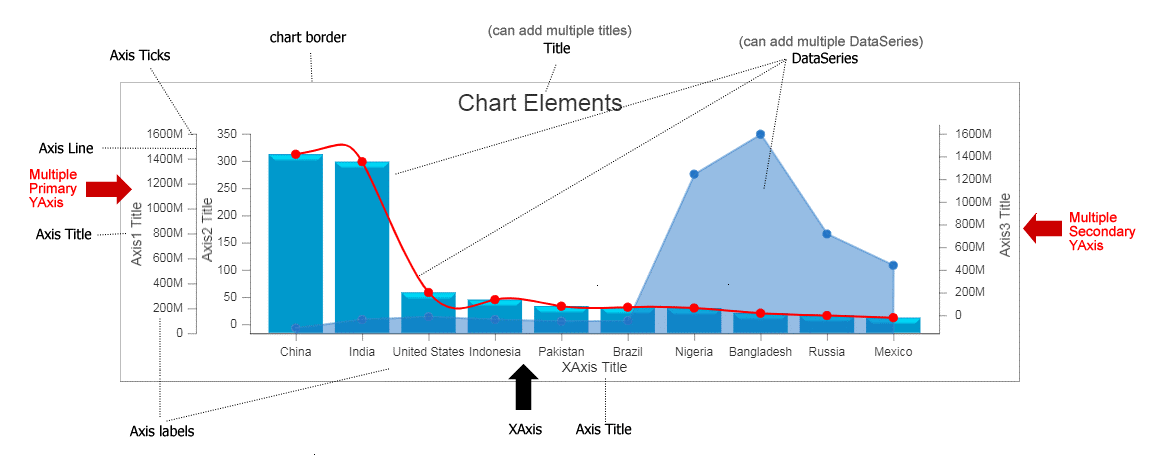
Chart element
Class: Chart.Chart()
Chart is the root element of the graph that you are going to draw. The following properties that can be applied on Chart.
Code using Chart Class
                                     var chart = new Cosfire.Chart("chart-div",{width:700,
                                            height:250
                                            background:'#bee8c6',
                                            cornerRadius:[5, 5, 5, 5]
                                           });

 titles: [{text: 'Chart Title'}];
 axesX: [{title: 'XAxis Title'}];
 axesY: [{title: 'YAxis Title',
          valueFormatRange: [1000, "K", 1000000, "M"],
        }];
 data: [{
         plotAs: 'column',
         color:'#ed68e9',
         points: [
                 {xLabel: "China", y: 1439323776},
                 {xLabel: "India", y: 1280004385},
                 {xLabel: "U.S.", y: 531002651},
                 {xLabel: "Brazil", y: 212559417},
                 {xLabel: "Nigeria", y: 206139589},
                 {xLabel: "Russia", y: 145934462},
                 {xLabel: "Mexico", y: 128932753},
                 ],
        },
        {plotAs: 'spline',
         color:'#0d5e53',
         points: [
                 {xLabel: "China", y: 1439323776},
                 {xLabel: "India", y: 1280004385},
                 {xLabel: "U.S.", y: 531002651},
                 {xLabel: "Brazil", y: 212559417},
                 {xLabel: "Nigeria", y: 206139589},
                 {xLabel: "Russia", y: 145934462},
                 {xLabel: "Mexico", y: 128932753}
                 ]
        }
 ];

chart.setData(data);
chart.render();
Using JSON Approach
                                    var chartJSON = {
    width:700,
    height:250,
    background:'#bee8c6',
    cornerRadius:[5, 5, 5, 5],
    titles: [{ text: 'Chart Title' }],
    axesX: [{ title: 'XAxis Title' }],
    axesY: [{ title: 'YAxis Title',
              valueFormatRange: [1000, "K", 1000000, "M"],
           }],
    data: [{plotAs: 'column',
            color:'#ed68e9',
            points: [{ xLabel: "China", y: 1439323776 },
                     { xLabel: "India", y: 1280004385 },
                     { xLabel: "U.S.", y: 531002651 },
                     { xLabel: "Brazil", y: 212559417 },
                     { xLabel: "Nigeria", y: 206139589 },
                     { xLabel: "Russia", y: 145934462 },
                     { xLabel: "Mexico", y: 128932753 }],
           },
           {plotAs: 'spline',
            color:'#0d5e53',
            points: [{ xLabel: "China", y: 1439323776 },
                     { xLabel: "India", y: 1280004385 },
                     { xLabel: "U.S.", y: 531002651 },
                     { xLabel: "Brazil", y: 212559417 },
                     { xLabel: "Nigeria", y: 206139589 },
                     { xLabel: "Russia", y: 145934462 },
                     { xLabel: "Mexico", y: 128932753 }],
           }],
  };

 chart = new Cosfire.Chart("chart-div", chartJSON);
 chart.render();
List of Properties Supported in chart.
| Styling Properties | ||||
| Property | Type | Default | Possible Values | Description |
|---|---|---|---|---|
| width | Number |
auto | Number > 0 | Width of the chart. |
| height | Number |
auto | Number > 0 | Height of the chart. |
| theme | String |
default | • default • soft-light • deep-dark | Theme for Chart. |
| bevel | Boolean |
true | • true • false | Make the data point look glossy. Currently available for column and bar chart. |
| border | Number |
1 | Number > 0 | Border width of the chart. |
| borderColor | String |
#000000 | HTML supported Color names or RGB, HEX, HSL, RGBA, HSLA values. | Border color of the chart. |
| background | String |
#FFFFFF | HTML supported color names or RGB, HEX, HSL, RGBA, HSLA values. | Background of the chart. |
| shadow | Boolean |
false | • true • false | Enable or disable shadow of the Chart. |
| animationEnabled | Boolean |
false | • true • false | Enable or disable chart Animation. |
| cornerRadius | Array(Number) |
[0,0,0,0] | [left, top, right, bottom] | Corner Radius of the Chart. |
| tooltip |
Cosfire.Tooltip()
|
--- | --- | Global Tooltip configuration can be set here. |
| verticalHairlineEnabled | Boolean |
false | • true • false | Display vertical hairline on mouse move. Currently supported with single x-axis only. |
| horizontalHairlineEnabled | Boolean |
false | • true • false | Display horizontal hairline on mouse move. Currently supported with single y-axis only. |
Example:
Code using Axis Class
                                    var chart = new Cosfire.Chart("chart-div",
                                  /* Create instance of Chart */
                                  { width: 500,
                                    height: 300,
                                    background: "#bee8c6",
                                    cornerRadius: [5, 5, 5, 5],
                                    theme: "default",
                                    border:1,
                                    borderColor: "#000000",
                                    animationEnabled: false,
                                    verticalHairlineEnabled: false,
                                  });

/* Add to chart */
chart.chart.add(chart);
Using JSON Approach
                                    var chartJSON = {width: 500,
                 height: 300,
                 background: "#bee8c6",
                 cornerRadius: [5, 5, 5, 5],
                 theme: "default",
                 border:1,
                 borderColor: "#000000",
                 animationEnabled: false,
                 verticalHairlineEnabled: false,
                };

var chart = new Cosfire.Chart("chart-div", chartJSON);
| Collection Type Properties | ||||
| Property | Type | Description | ||
|---|---|---|---|---|
| titles | Array Cosfire.Title() |
Collection of chart titles. | ||
| axesX | Array Cosfire.Axis() |
XAxis collections of the chart nothing but list of multiple X Axis in the chart. | ||
| axesY | Array Cosfire.Axis() |
YAxis collections of the chart nothing but list of multiple Y Axis in the chart. | ||
| data | Array Cosfire.DataSeries() |
List of DataSeries of the chart. One chart can have multiple data-series in case of multi series chart. | ||
| Supported Methods/Functions | ||||
| Function | Description | |||
|---|---|---|---|---|
| setData(Array[Chart.DataSeries]) | setData() api is used to update the chart data at realtime. Where data is an Array of DataSeries and DataPoints are the points inside each DataSeries. | |||
| update(config, discardOldConfig) | config - You update entire chart or selective properties of chart by passing chart object properties in a JSON object. If you want to update only data-points of the chart at realtime then its always recommended to use setData() function to avail best performance. discardOldConfig - Second parameter of the function is a Boolean value. Set forceDiscardOldConfig as true if you want to discard old config completely. Set it to false if you just update few properties without affecting other existing properties. | |||
| setProperty(propertyName, value) | Set any particular property using setProperty() API | |||
| getProperty(propertyName) | Get any particular property using getProperty() API | |||
| chart.render(function callback(){}) | After updating any property of chart using setData() or setProperty() or update(), you need to call chart.render() to render the chart. If you pass a callback then the call-back function will be called once the rendering is finished. Call-back function is an optional parameter. | |||